
Backup for Small Business: What to Protect and How
A practitioner's guide to small business backup: the 3-2-1 rule, ransomware-resistant design, recovery targets, restore testing and a buyer's checklist.
A small business backup program works when three things are true: every system that runs the business is covered, at least one copy sits where ransomware cannot reach it, and someone has restored from it recently enough to know the process holds. Most failures trace back to one of those three conditions, not to the software. This guide sets out the design decisions, the recovery targets and the tests that separate a backup that exists from a backup that recovers.
It is written for owners, IT managers and operations leaders at small and mid-sized organizations, and for local government and public safety teams that run lean technology staffs and carry the same exposure as larger organizations.
TL;DR
- Follow the 3-2-1 rule: three copies of important data, on two types of media, with one copy off-site.
- Keep at least one copy offline or in a segmented environment, because ransomware actors look for backups and encrypt them when they can reach them.
- Define a recovery point objective and a recovery time objective before choosing a tool, as NIST recommends.
- Back up cloud-hosted email and files too: the provider keeps the service available, but the customer remains responsible for protecting its own data.
- Test restores on a schedule. An untested backup is an assumption.
Table of Contents
- Why backup is a security control, not an IT chore
- What a small business actually needs to back up
- The 3-2-1 rule and what it means in practice
- Backing up cloud email and files
- Set recovery targets before choosing a tool
- Local, cloud or hybrid
- Encryption, access and sensitive data
- Testing: the step that decides the outcome
- Questions to ask any backup provider or internal owner
- Where backup fits with detection and response
- How Simvay approaches backup
- A short starting plan
- FAQ
- Sources
Why backup is a security control, not an IT chore
Backup is usually filed under IT administration, and that framing causes most of the damage. The threats that make backup necessary are security events: ransomware, destructive intrusions, compromised administrator accounts and malicious insiders. CISA lists cyberattacks, system failures, accidental deletion and natural disasters as causes of data loss that can halt operations and cause lasting damage for small and medium businesses.
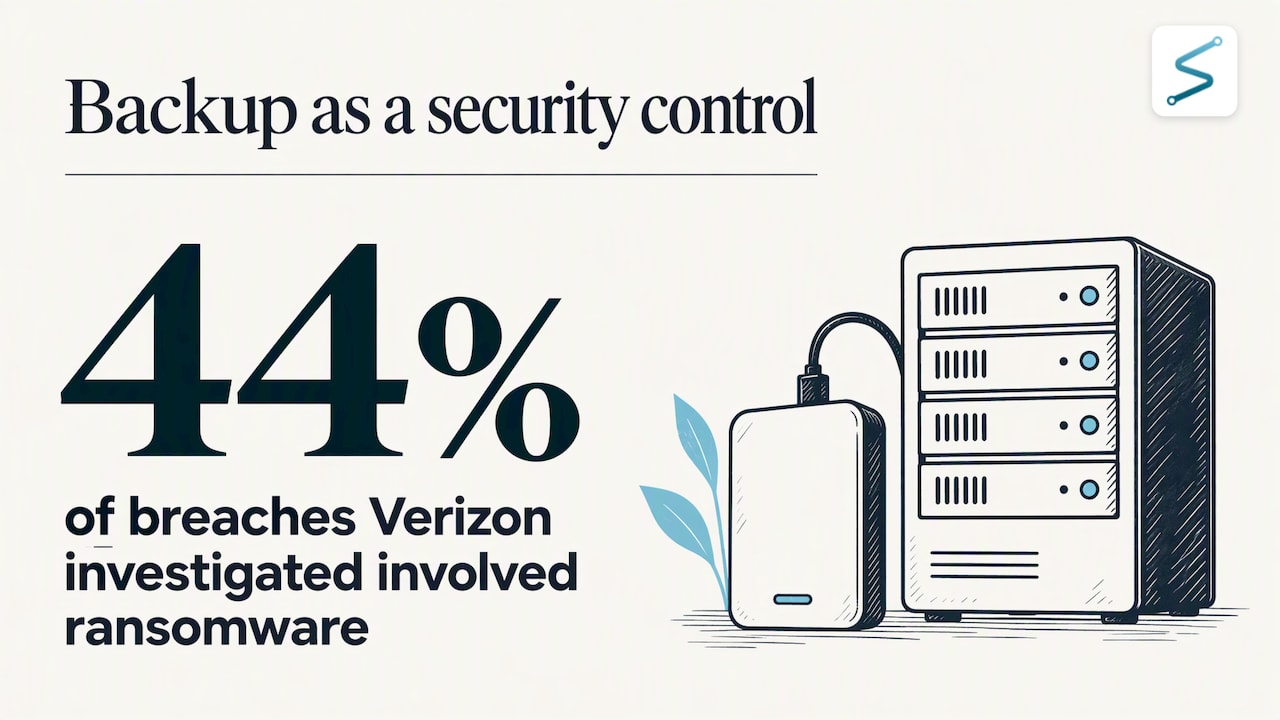
Ransomware is the scenario that most often decides whether a backup program was adequate. CISA cites Verizon's 2025 data showing that ransomware was involved in 44% of the breaches Verizon investigated, and presents secure backups as a primary way to recover without paying. The FBI's Internet Crime Complaint Center also continues to report ransomware as among the most reported threats to critical infrastructure organizations, which includes the municipal utilities, public safety agencies and small operators that often run the thinnest IT teams.
The practical consequence is that an attacker who gains administrative access will usually try to remove your ability to recover before announcing themselves. A backup that sits on the same domain, reachable with the same credentials as production systems, is part of the attack surface. Design it as if the domain has already been compromised.
What a small business actually needs to back up
Start from the business processes, not from the servers. Ask what the organization could not operate without for three days, then trace each of those functions to the systems and data behind it.
A typical inventory includes:
- File shares and document repositories, on premises or in the cloud.
- Email, calendars and collaboration data hosted by a cloud provider.
- Line-of-business applications and their databases: accounting, case management, dispatch, patient or client records, scheduling.
- Virtual and physical servers, including domain controllers and the identity infrastructure that everything else depends on.
- Configuration data for firewalls, switches, hypervisors and other infrastructure, which is quick to back up and slow to rebuild from memory.
- Endpoints that hold unique data, such as laptops used in the field, where files may never reach a server.
- Software-as-a-service applications that hold records of their own, such as CRM and HR platforms.
Two gaps appear repeatedly. The first is identity: if the directory that authenticates every user is lost and there is no clean copy, recovery of everything else stalls. The second is the assumption that anything in the cloud is already protected, which the next section addresses.
The 3-2-1 rule and what it means in practice
CISA describes the rule in simple terms: maintain three copies of important files, on two different types of storage media, with one copy held off-site, away from the primary business location. The logic is that no single failure, whether a dead disk, a fire, a theft or a compromised account, can remove every copy.
In a small environment this commonly looks like the following:
| Copy | Where it lives | What it protects against |
|---|---|---|
| Production data | Servers, workstations, cloud applications | Nothing: this is the data you are protecting |
| Local backup | A separate appliance or storage system on the network | Fast restores after deletion, corruption or hardware failure |
| Off-site backup | Cloud storage or a physical location away from the office | Site loss, theft, fire, flood |
The rule is a floor. Against ransomware, one more property matters: at least one copy must be unreachable from the production network with production credentials.
Designing for ransomware
CISA's ransomware guidance states that backups should be maintained offline, because ransomware actors seek out and encrypt reachable backups. Several design choices follow:
- Separate credentials. The account that manages backups should not be a domain administrator, and domain administrators should not be able to delete backup sets without a second control.
- Immutability or an air gap. An off-site copy that cannot be altered or deleted for a defined retention window survives even if an attacker holds your administrator credentials. Offline media rotated out of the network achieves the same result with more manual effort.
- Network segmentation. Backup infrastructure belongs on its own segment with restricted inbound access, and management consoles should require multi-factor authentication enforced technically. CISA's small business guidance makes the point that MFA must be mandated through technical controls, not left to users to complete.
- Monitoring of the backup system itself. Failed jobs, sudden changes in retention settings, bulk deletions and logins to the console from unusual locations are all early indicators of an intrusion. Backup telemetry is worth sending to whatever monitoring you operate.
Backing up cloud email and files
CISA's guidance encourages small and mid-sized businesses to move on-premises email and file services to managed cloud alternatives, since securing local infrastructure takes specialized expertise that few small organizations can maintain continuously. That advice is sound, and it does not remove the backup question.
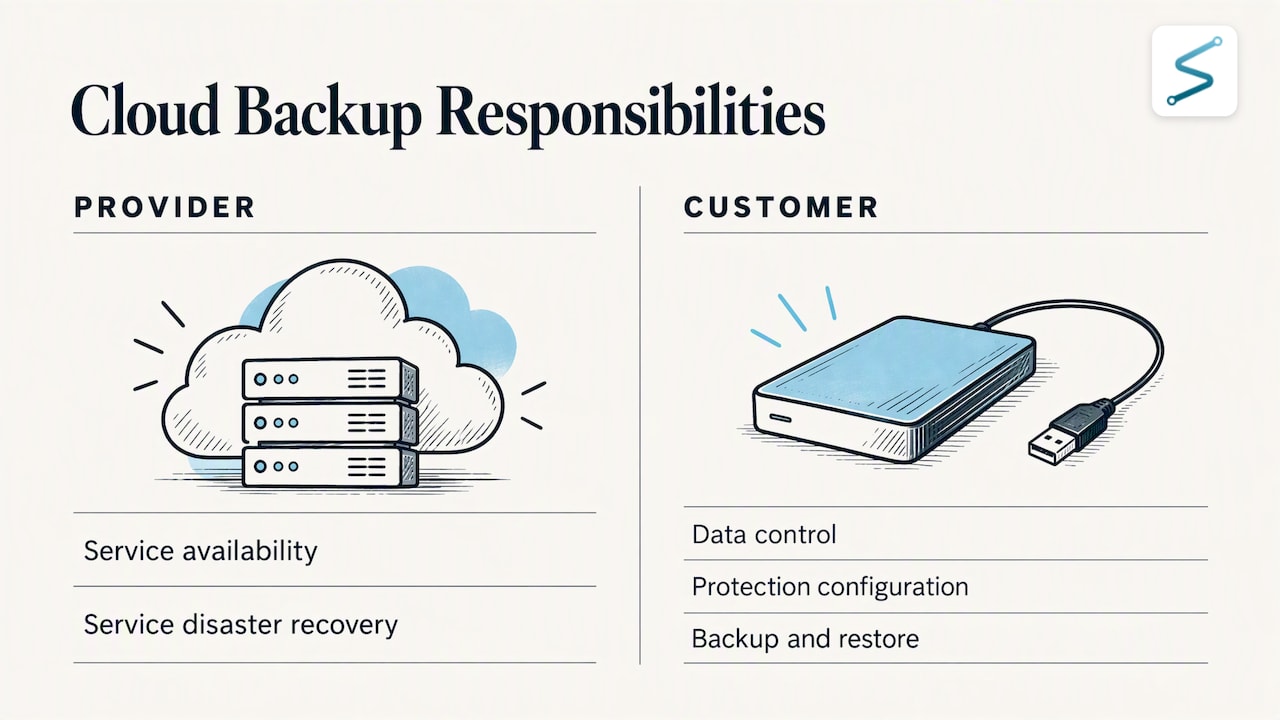
Microsoft's own best-practices whitepaper for its cloud productivity suite draws the line clearly. The provider offers high availability and disaster recovery for the service, but the customer retains control of its data, and recovering from customer-side problems such as a ransomware attack or a mistaken deletion requires a dedicated restore solution.
The working principle: service availability is the provider's job, and data recoverability is yours. Whoever hosts your email, documents and line-of-business applications, confirm in writing what the provider retains, for how long, and how you would recover a mailbox or a library to a specific point in time. If the answer depends on a recycle bin with a fixed window, treat that as an unprotected system.
Set recovery targets before choosing a tool
Most buying conversations begin with product features. NIST's guidance for backup practitioners begins elsewhere: organizations should explicitly define a recovery point objective and a recovery time objective so the backup strategy matches actual continuity needs.
- Recovery point objective (RPO) is the maximum acceptable age of the data you restore. A nightly backup implies an RPO of up to 24 hours of lost work.
- Recovery time objective (RTO) is the maximum time you can tolerate between failure and restored operations.
Set them per system, not once for the whole organization. A worked example for a small municipal office or a mid-sized professional services firm might look like this:
| System | Business impact of loss | RPO to discuss | RTO to discuss |
|---|---|---|---|
| Billing or case management database | Revenue or service delivery stops | Hours | Hours to one day |
| Communication stops, records at risk | Hours | One day | |
| General file shares | Disruptive, partly recoverable from other sources | One day | Several days |
| Archived projects and old records | Low daily impact | One week | Weeks |
The numbers above are prompts for a conversation, not recommendations. The point is that a system with an RPO of one hour cannot be protected by a nightly job, and a system with an RTO of four hours cannot depend on downloading terabytes from a slow off-site link. Compare each target to the real restore speed of your design. Bandwidth is the constraint small businesses most often miss: a large data set that took weeks to upload will not return in an afternoon unless there is a local copy or a recovery process designed for speed.
Local, cloud or hybrid
CISA's guidance on backup options asks organizations to weigh the advantages and risks of each media type against budget, data volume and the sensitivity of the data. Describing the main approaches by type:
- Local backup to a dedicated storage system. Fast to restore, fully under your control, and exposed to the same fire, theft or flood as the office. It also shares the network with whatever infects it unless segmented and credentialed separately.
- Cloud backup to off-site storage. Satisfies the off-site requirement, scales with data growth, and removes the burden of rotating media. Restores are limited by bandwidth, and security depends on how access, encryption and retention are configured.
- Hybrid. A local copy for fast recovery of common failures plus an immutable cloud copy for site loss and ransomware. For most small and mid-sized environments this is the arrangement that meets 3-2-1 without manual media handling.
- Offline media. Disks or tapes disconnected after the job runs. Strong against ransomware, weak on convenience, since it depends on someone doing the rotation every time.
Match the approach to the targets. If your RTO for core systems is measured in hours, a local or hybrid design is usually needed. If the main risk is catastrophic loss and the data changes slowly, cloud-only may be enough.
Encryption, access and sensitive data
Backups contain every sensitive record that production does, often with weaker access controls. Treat them accordingly. Encrypt data in transit and at rest, keep encryption keys in a place that survives the loss of the systems they protect, and limit who can restore data as well as who can delete it. Organizations covered by sector rules, such as health information requirements or the obligations on Ohio public entities, should confirm that their backup copies, retention periods and storage locations fit those rules. Ohio's public-sector cybersecurity obligations bear on how local governments and other public entities plan for incidents and recovery, so a public-sector backup design should be reviewed against them rather than assumed to comply.
Testing: the step that decides the outcome
CISA's small business guidance is direct about this: restoration testing is not optional, because organizations often discover during a real incident that restores take much longer than expected or that backups are incomplete. A green status in the backup console confirms that a job ran. It does not confirm that the data can be rebuilt into a working system.
A workable testing schedule for a small organization:
- Monthly: restore a sample of files and one mailbox or application record, and confirm the contents open correctly.
- Quarterly: restore one full server or critical application into an isolated network and verify it works, recording how long it took against your RTO.
- Annually: run a tabletop exercise in which the loss of the primary environment is assumed, covering who makes decisions, who contacts whom, and the order in which systems return. Include the identity infrastructure and the backup system's own credentials.
- After any major change: new servers, a migration or a change of provider should trigger a fresh test.
Record each test: what was restored, how long it took, what failed. The record is useful to leadership, to auditors and to insurers, and it turns an informal belief into evidence.
Questions to ask any backup provider or internal owner
Whether the backups are run in house or by an outside team, these questions expose weak designs quickly:
- Which systems are in scope, and which are explicitly excluded?
- What are the RPO and RTO for each system, and when were they last proven by a restore?
- Is at least one copy immutable, offline or segmented, and who holds the credentials that could delete it?
- Is the backup console protected with enforced multi-factor authentication?
- How are backup failures detected, and who is alerted?
- What happens to the data and the keys if the relationship ends?
- Who performs the recovery during an incident, and have they done it before for an environment like yours?
The last question is easy to overlook. Recovery during a live incident is a different activity from routine backup administration: the environment may be untrusted, systems have to be restored in a safe order, and the attacker's access has to be closed before restored systems reconnect. NIST's guide to conducting, maintaining and testing backup files was written with managed providers in mind for this reason: the quality of the process matters as much as the technology.
Where backup fits with detection and response
Backup limits the damage after an attack. It does not stop the attack, and it does not tell you the attacker has left. Ransomware operators commonly spend time inside a network before encrypting anything, and restoring into an environment where they still have access invites a second event. Backup therefore belongs alongside continuous monitoring, managed detection and response, vulnerability management and a tested incident response plan. For readers weighing monitoring options, Simvay's guide to what MDR costs explains what drives those engagements.
NIST's small business quick-start guide for the Cybersecurity Framework 2.0 organizes this thinking around functions including protect, detect, respond and recover. Backup is the core of the recover function, and it only works well when the other functions support it.
How Simvay approaches backup
Simvay is a Cleveland-rooted cybersecurity firm headquartered in Westlake, Ohio, serving Ohio and clients nationwide, with a focus on small and mid-sized organizations, the public sector and critical infrastructure. Its Backups as a Service covers backup and recovery managed as part of a security engagement, delivered by an in-house, US-based team and paired with infrastructure support that is provided alongside that engagement rather than as a standalone IT service. Organizations that want the backup design reviewed against their detection, response and compliance obligations can start from Simvay's services overview or see who Simvay serves.
A short starting plan
For an organization with no formal program, this sequence delivers the most risk reduction for the least effort:
- List the systems and data the organization could not operate without, including identity and cloud-hosted data.
- Assign an RPO and RTO to each, and note where the current setup cannot meet them.
- Implement 3-2-1 with one immutable or offline copy and separate backup credentials.
- Enforce multi-factor authentication on the backup console and on every administrative account.
- Run the first restore test within thirty days and write down the result.
- Put the schedule for monthly, quarterly and annual tests on the calendar with a named owner.
- Connect backup alerts to the same monitoring that watches the rest of the environment.
FAQ
What is the 3-2-1 rule for data storage?
It means keeping three copies of important data, on two different types of storage media, with one copy off-site. CISA presents it as the baseline for small and medium businesses. For ransomware resilience, make sure one of those copies is also offline, immutable or segmented from the production network.
Is cloud storage enough as a backup?
Only if it is configured and tested as a backup. Syncing files to a shared folder replicates deletions and encrypted files along with good data. Microsoft's guidance separates service failures, which its cloud suite handles natively, from customer-side problems such as ransomware or mistaken deletion, which need a dedicated backup and restore capability.
How often should a small business back up its data?
As often as its recovery point objective requires. NIST advises defining the maximum acceptable age of backup files for each system. A transaction database may need hourly protection, while archived documents may be fine weekly.
How often should backups be tested?
Regularly, and on a schedule someone owns. CISA states that organizations frequently find restores slower than expected or backups incomplete only during a real incident. A monthly sample restore and a quarterly full-system restore is a reasonable cadence for most small organizations.
Sources
- Back Up Business Data, CISA
- #StopRansomware Guide, CISA
- Cyber Guidance for Small Businesses, CISA
- Data Backup Options, CISA
- Protecting Data from Ransomware and Other Data Loss Events, NIST CSRC
- NIST Cybersecurity Framework 2.0: Small Business Quick-Start Guide
- Microsoft 365 Backup: Best practices for data recovery and business continuity, Microsoft
- 2025 IC3 Annual Report, FBI